Find the right light.
Browse the community map or search a pole number or location. Identify the fixture before you log the issue.
Pole number or location
 LumenLIGHTING REPORTS
BUILT FOR THE COMMUNITY ROUND
Find the light. Capture the issue. Give your maintenance team a report they can actually use.
Lumen brings your lighting locations, inspection notes and photos into one practical workflow—so the details make it from the person on patrol to the person making the repair.
Available on the App Store. Community setup is arranged with Lumen.
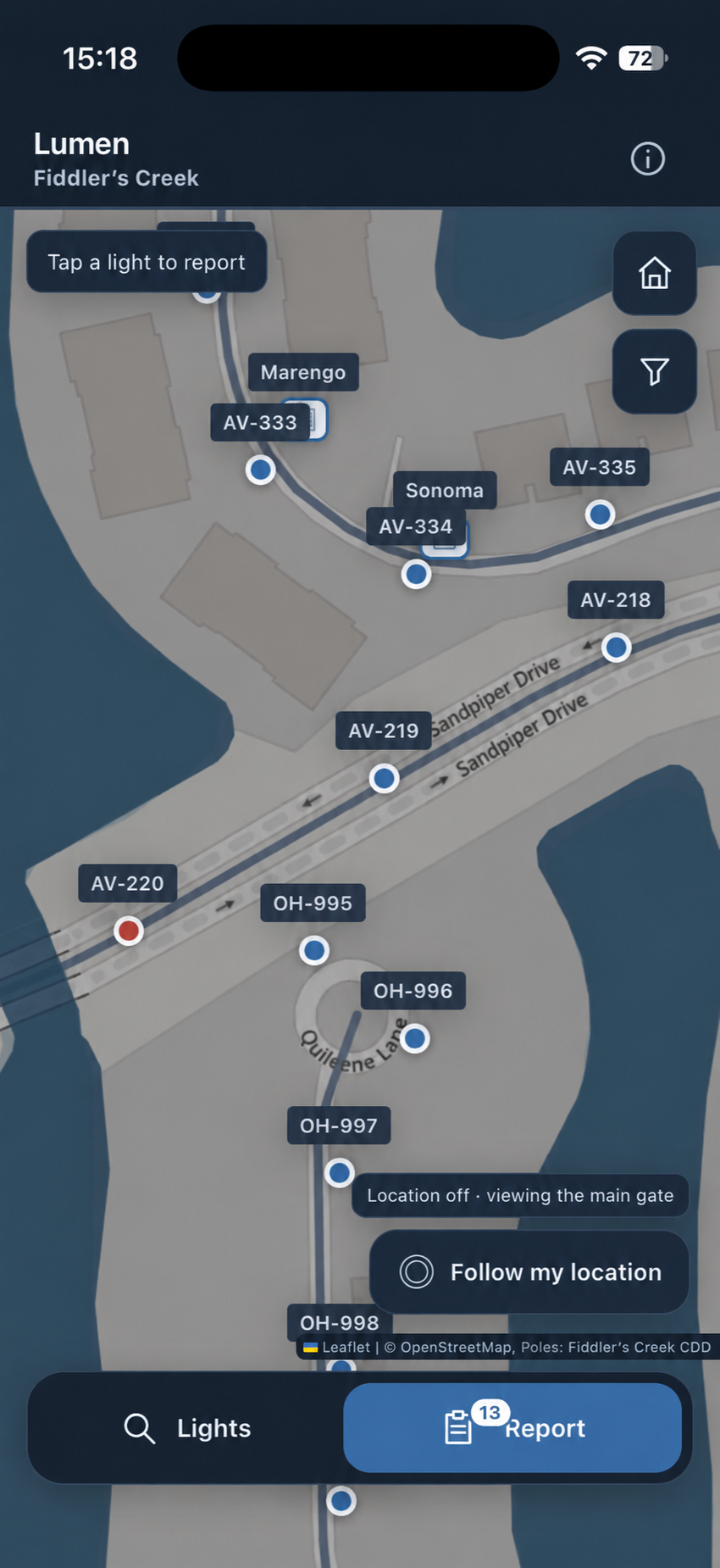
01Know the exact pole.Readable IDs beside each light.
02See the surroundings.Roads, entrances and landmarks.
View full size ↗Actual iPhone pilot screenshot · Fiddler’s Creek
Made for the people who keep a community running.
TAKE A CLOSER LOOK
See the actual iPhone patrol map, then step through fixture selection and reporting in the web pilot. Report examples use demonstration entries. Appearance can vary by device and app version.
Select a marker or use Lights to search a pole number or location. Optional foreground location helps you find nearby fixtures; you can also browse manually.
01 / Map · actual iPhone pilot capture
FROM THE ROUND TO THE REPAIR
No more trying to match an unclear description to a light somewhere on the property. Keep the location and the evidence together.
Browse the community map or search a pole number or location. Identify the fixture before you log the issue.
Add the affected fixture, a useful note and a photo. Keep inspection observations together while you complete the round.
Review the reported locations and submit. Lumen prepares the community’s reports and delivers the identifiers, issues and visual context to the chosen recipients.
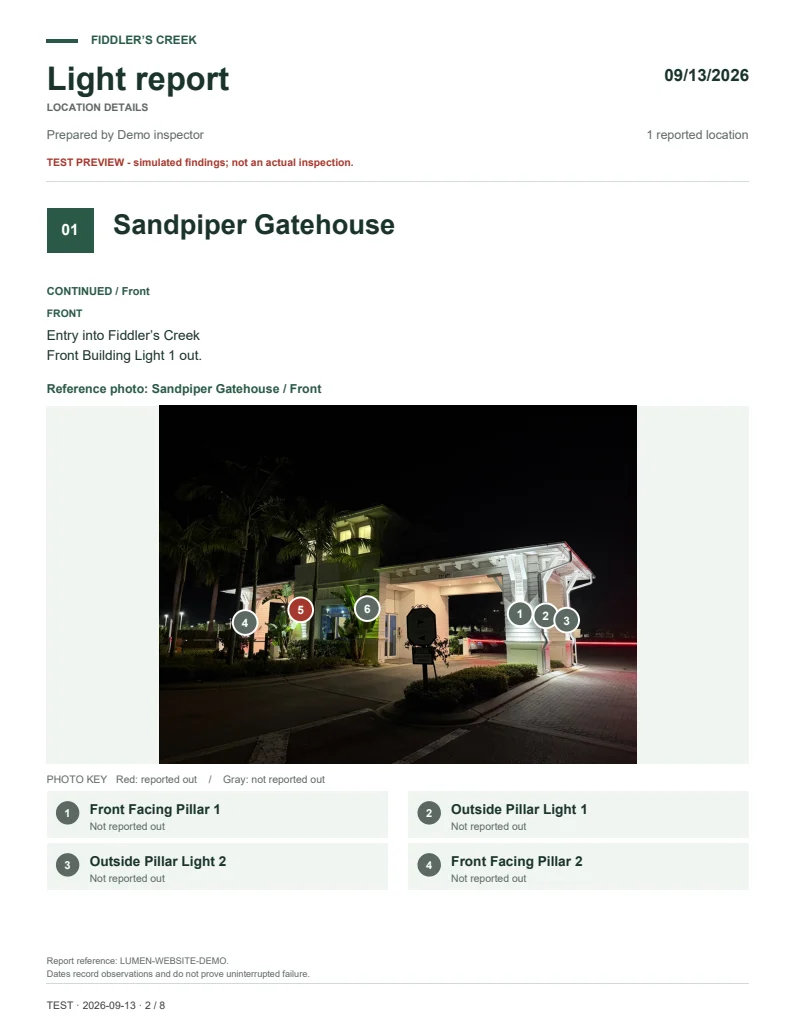 Actual PDF export · open the complete example ↗
BUILT AROUND THE HANDOFF
Your community. Your report format. We work with you during setup to tailor the layout, included details and recipients to the way your team works. Patrol keeps one simple review-and-submit flow.
The examples below show the current Fiddler’s Creek report package. Your community’s report format and delivery requirements are agreed during pilot setup. Features vary by installed build.
OPEN THE OUTPUT
A sample Sandpiper Gatehouse observation, exported by Lumen. Every file is marked as a test. These are demonstration findings, not a maintenance request.
The black-and-white report table. Unused areas are left out; photographs and detailed notes stay in the second document.
Open summary PDF ↗PDF · 8 PAGESThe full gatehouse example, including its reference views, numbered fixtures and observation information.
Open details PDF ↗INTERACTIVE · BROWSERPan and zoom the report map, select the reported location, and follow its details and photo links.
Explore sample map ↗The interactive map runs in a browser. Email attachment previews may show only a static preview. Sample downloads contain public pilot reference material and simulated observations.
ONE ROUND. THREE PERSPECTIVES.
Find a known location, identify the affected light, and record it while you are there. Notes and photos add context when an identifier alone is not enough.
Review a consistent report instead of piecing together descriptions and separate photographs. Keep a concise summary alongside the supporting detail.
Receive the identifier, location and visual context for the reported issue. Continue using your existing repair process and preferred software.
STARTING WITH A REAL WORKFLOW
Lumen grew from hands on community patrol work: finding the right fixture, recording a clear observation, and handing over a report that the next person can act on.
We’re building an independent service for other communities and property teams. New pilots begin with a conversation about your inventory, your inspection process and who needs the report.
Fiddler’s Creek is the initial pilot community. Lumen is an independent product.
BRINGING LUMEN TO YOUR COMMUNITY
A pilot starts with the people who inspect, the manager who receives the report and the team that repairs the lights.
Confirm which lights belong to the association, district, club or utility, who inspects them, and who receives repair requests.
Bring an existing pole list, map, sample report or reference photos. We’ll identify what can be imported and what needs additional mapping or cleanup.
Agree on the locations, report format, staff access, recipients, training and setup price. Additional community access and onboarding are being developed; they are not instant self-service features today.
Once the agreed setup and access checks are complete, have your team try the workflow. Review the output with management and maintenance before deciding on broader use.
Lumen documents the findings. Your community keeps control of repair approvals and its maintenance relationship. Direct contractor accounts, invoicing and payments are not included in the current service.
BEFORE WE GET STARTED
After reference information is prepared on a device, staff can record observations and finish a round locally. Email, shared-reference refreshes and hosted report links need a connection. Prepare the device before the first patrol.
Lumen is available for iPhone and iPad, with a companion Apple Watch app. The web app also supports browser use. Connect each device to its assigned community before patrol.
Inspections save on the device first and synchronize for connected community devices. Wait for shared changes to finish syncing before continuing on another device. Offline work stays on the original device until it uploads. Keep a backup before removing the app or clearing browser storage.
The current Fiddler’s Creek reference pilot is public. Private workspaces and authorization for additional communities are being developed. We will agree on access requirements and verify isolation before onboarding another community’s private data.
That is the plan for each new pilot. We’ll review the locations, identifiers, maps and reference photos you have, then agree on the onboarding scope. Self-service onboarding for additional communities is not yet available.
No. The report workflow is designed to help your team document work for its existing maintenance provider. Direct contractor accounts, invoicing and payments are future features.
Pricing has not been published. Tell us about your community and workflow so we can discuss a suitable pilot scope and provide a proposal. Requesting information does not start a subscription or commit you to a purchase.
Lumen is available on the App Store for iPhone and iPad, with an Apple Watch companion. Community setup is arranged with an administrator. Contact us to discuss a demonstration or a new community.
LET’S TALK ABOUT YOUR COMMUNITY
Tell us who you are, which community you manage and how you report lighting issues today. We’ll discuss whether Lumen is a fit.